


Before a bot answers students at 2 a.m., know what it’s reading and who gets paged when it breaks.
Imagine it’s Thursday night. The financial aid office finishes verification on a student and repackages her award. Her grant drops by $2,400. The SIS is now correct.
The AI agent the college launched last fall doesn’t read the SIS directly. It reads a copy of that data that last synced the night before. Friday morning, the student asks the agent what her aid looks like, and it gives her the old number, clearly and confidently, in writing. That afternoon she signs an apartment lease.
Two weeks later, her bill arrives. Her parents call the president’s office with a screenshot.
The AI didn’t malfunction. It reported exactly what it was given. The failure was in the integration: how fresh the data was, when the sync ran, and the fact that nobody owned the gap between the SIS and the agent.
I’ve spent about 20 years running the SIS side of these integrations, and this is the failure I’d worry about most as campuses deploy agents.
Most AI-agent evaluations spend the demo on the model, the tone, and the chat widget. What actually decides whether students can trust the agent is the integration underneath it. Does it read live SIS data? Has anyone agreed which system is the source of truth for each answer? Is a named person accountable when the sync breaks?
Here’s how I’d judge whether a deployment is on solid ground.
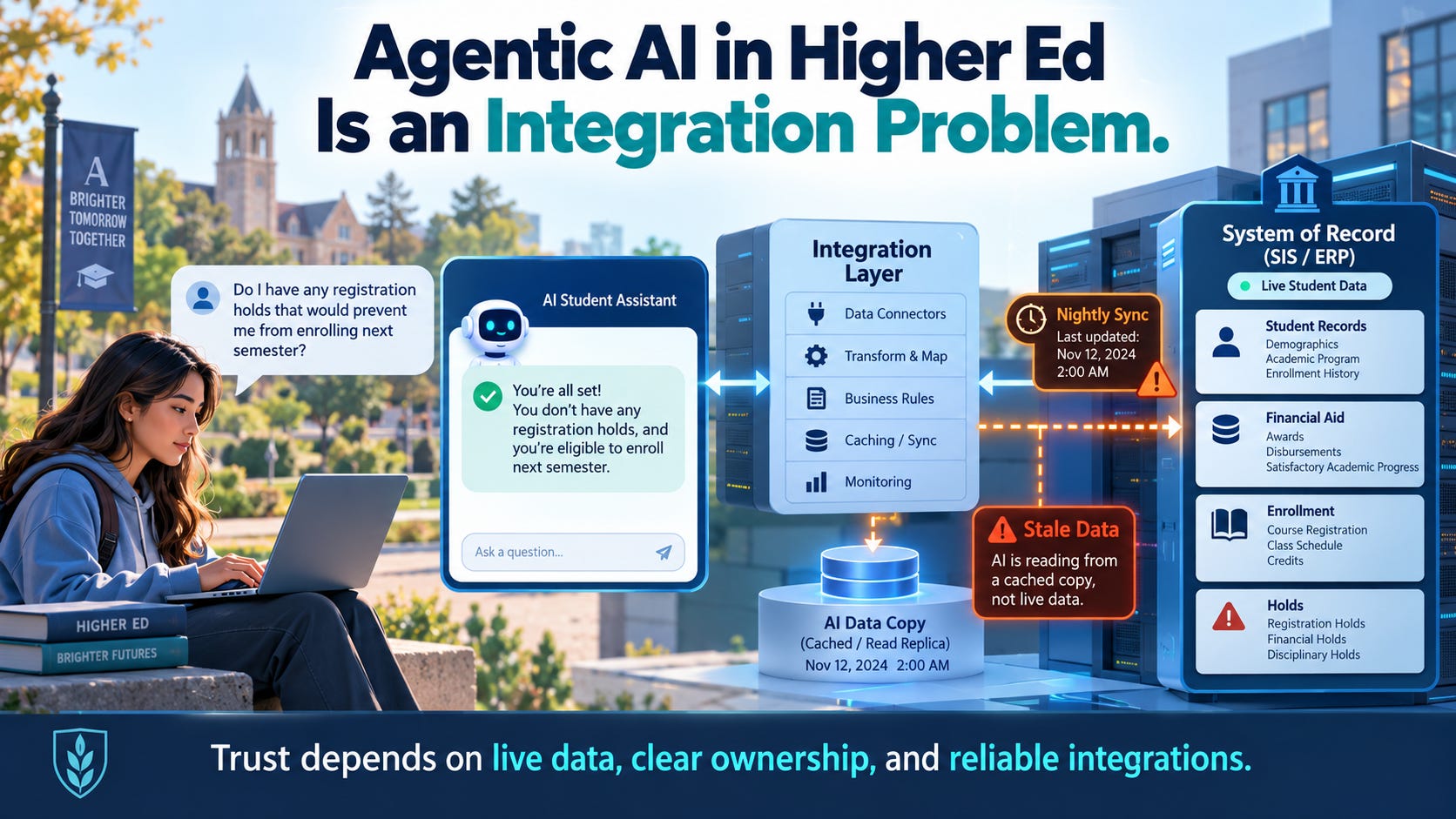
Cached answers break trust
A student who asks “do I have a hold?” doesn’t want last night’s answer. They want to know whether they can register in the next ten minutes.
Not everything needs to be live. Plenty of what students ask about can sit in a nightly batch or a document index without hurting anyone:
Course catalog descriptions
Published policies and handbook language
Term calendars and published deadlines
Office locations, hours, and general how-to content
Other data changes during the business day, and a stale copy is worse than no answer at all:
Service indicators (holds), which get placed and released all day
Financial aid award and disbursement status
Enrollment, including adds, drops, and waitlist movement
Student financial balances
Application status, especially after decision release
The second list needs a live read against the system of record at the moment the student asks. If a vendor tells you their agent answers hold or aid questions from a nightly extract, you’ve learned something important about that vendor.
The student with the lease won’t blame the sync schedule. She’ll stop trusting the bot, and so will everyone who sees her screenshot. One bad answer can cost the whole AI initiative its credibility, with students and with the cabinet that funded it.
Most campuses will layer AI, not replace systems
Very few campuses are going to replace their SIS or CRM to get AI. The SIS took years to implement; it touches money and federal reporting, and nobody wants to go through that again for a chatbot.
So the realistic architecture is AI layered on top of what you already run. That makes the integration layer the actual product. Connecting an agent correctly to Campus Solutions, an Ellucian SIS, or Salesforce or Slate on the recruitment side is where the work and risk live.
I’ve been through this before on the CRM side. I administered PeopleSoft CRM for years and helped lead the move to Salesforce. Duplicate records took the most work. A prospect who filled out an inquiry form with a personal email and later applied with a school email turned into two people until someone built the matching rules. The hardest decisions in that project weren’t about Salesforce features. They were about who owned each field, which direction data flowed, and what happened when the two systems disagreed about the same student.
AI agents raise exactly the same questions. They just raise them in front of students.
The SIS data model is the hard part
In Campus Solutions, a “student” isn’t one row. It starts with an EMPLID. Under that sit one or more academic careers (ACAD_CAREER), programs and plans within each career (ACAD_PROG, ACAD_PLAN), the terms the student is activated for (STRM), and on the admissions side an ADM_APPL_NBR for each application. Financial aid adds an aid year on top of all of it.
An agent that flattens all of that into “the student” will give wrong answers that sound right.
Take a student finishing her bachelor’s who has also started a graduate certificate. She now has two ACAD_CAREER records under one EMPLID. She asks, “Am I on track to graduate in May?” The agent checks the wrong career, measures her against the certificate instead of the degree, and tells her she’s 12 credits short. Now she’s emailing her advisor in a panic, or adding classes she doesn’t need.
Or take summer aid. Which aid year a summer term belongs to is a campus setup decision, and an agent that guesses can quote an award that doesn’t apply to the term the student actually asked about.
Neither answer looks like an error, which is what makes them dangerous.
A good integration resolves context before it answers: which career, which program, which term, which aid year. When it can’t tell, it asks the student. A vendor who can’t explain how their agent handles a student with multiple careers probably hasn’t done this on PeopleSoft before.
Standard frameworks help, but campus quality varies
Ellucian schools generally have Ethos, Ellucian’s standard API and integration platform, which gives vendors a common starting point.
On PeopleSoft, the toolkit is Integration Broker, Component Interfaces, and REST services. The tools are capable. What varies a lot is how each campus has used them. One campus has a documented set of service operations with sensible security. The next has a handful of one-off services built for a single vendor years ago, running under a generic account with far more access than it needs.
So before you evaluate the agent, evaluate what it would plug into.
This is where MCP comes in. I’ve written about what to settle before you trust an AI feature with PeopleSoft data: data classes, read versus write, and audit trails. Agent access is the new integration surface, but an MCP tool is still an integration with a new kind of client. It needs the same rules as every other integration: a defined system of record for each piece of data it returns, security that respects who is asking, and an owner.
“No IT lift” still has to be someone’s lift
Nearly every pitch in this space eventually promises some version of “no lift for your IT team.”
The work doesn’t disappear, though. Someone has to scope which data the agent needs and where it lives. Someone builds and secures the services. Someone monitors them. And someone keeps them working through PeopleTools upgrades, PUM updates, API version changes on the vendor’s side, and peak-season load.
If the answer is “your team,” it isn’t no-lift, and you should staff for it. If the answer is “us,” get it in writing, with monitoring, named accountability, and response times. The best model is the vendor owning the integration as part of the service: managed, monitored, and accountable.
Peak season is the real test
Demos happen in quiet months. Agents fail in loud ones.
The weeks that matter are admission decision release, aid packaging and award notification, census, and registration windows. That’s when traffic spikes, data changes fastest, and a wrong answer does the most damage.
Ask the vendor directly how monitoring and escalation work the week before decisions go out. Who is watching the integration? What triggers an alert, and who gets it? If an SIS service slows down or fails, does the agent say “I can’t check that right now, here’s who can help,” or does it quietly fall back to cached data and guess?
That fallback behavior will tell you more about a vendor than any demo.
Over time, integration should become configuration
Early campuses on any agent platform will need custom work. What matters is whether the vendor learns from it.
Each custom build should leave the vendor with a reusable capability: a configurable hold lookup that understands service indicator codes and their impacts, a career-aware academic progress call, an aid status service that knows about aid years. By the twentieth PeopleSoft campus, much of what started as custom work should be configuration. If every campus is still a one-off project, you’re buying services with a chat window on top.
The checklist
Here’s what I’d bring to any AI-agent evaluation:
Where does the agent’s SIS data come from? Which services, which service accounts, and what security.
How fresh is it, for each type of data? Get a specific answer for holds, aid, enrollment, balances, and application status.
Which system is the record for each answer? SIS, CRM, aid, or content repository. Write it down.
What does the agent say when the data is unavailable? It should say so and route the student, not guess.
Who owns the integration after go-live? A name and a team, not just “support.”
What happens when it breaks during decision week? Monitoring, alerting, escalation path, and response time.
How does it survive a PeopleTools upgrade or a vendor API change? Who runs the regression tests?
What gets logged? The question, the data retrieved, its source, and the answer given, so you can reconstruct a bad answer when a student escalates.
The models will keep getting better on their own. The integration will only be as good as the people who own it, and the vendors who win the agentic era in higher ed will be the ones who treat integration as part of the product, not a professional-services afterthought.
If you’re on the vendor side of this work, I’d like to hear how you handle it. And if this was useful, subscribe at peoplesoftcloud.com.